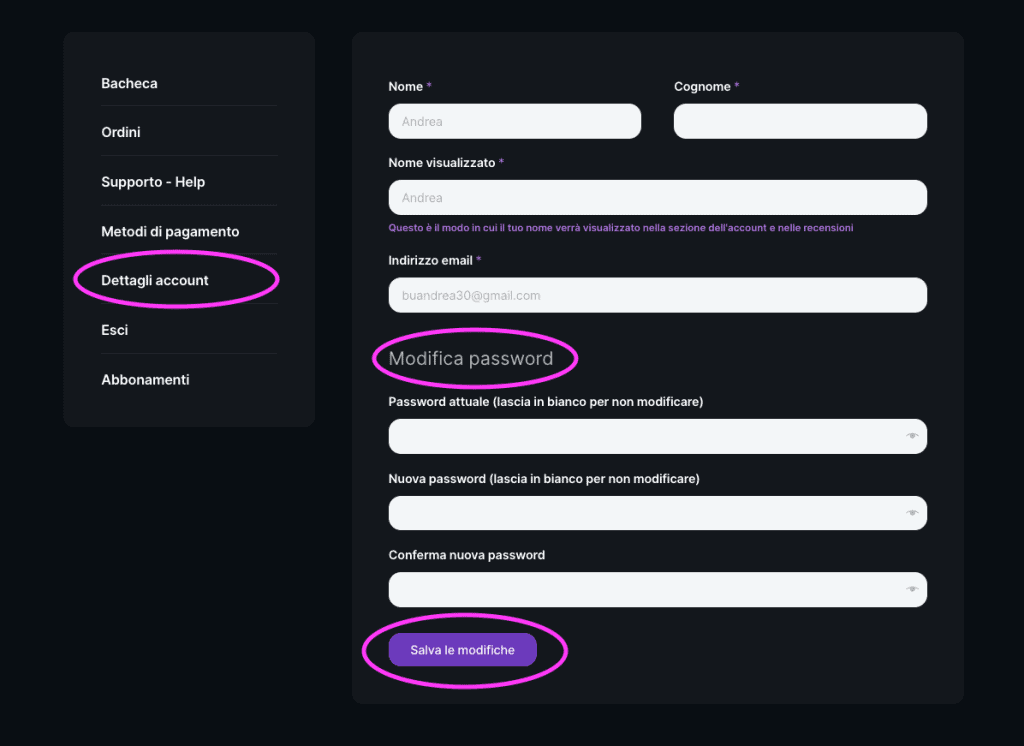
Access the MyAccount area:
- Access the MyAccount section from the discoverig.com website
Select Account Details:
- Select from the MyAccount menu the item Account Details.
Entering the New Password:
- In the Change Password section, enter the current password in the "Current Password" field and the new password in the "New Password" field
Confirmation of New Password:
- Enter the new password again in the "Confirm new password" field
Saving Changes:
- Click on the "Save Changes" button
Confirmation of Update:
- You should receive a confirmation email that your password has been successfully updated
Login with New Password:
- Log out of the account and log back in using the new password to make sure it works properly.

 EN
EN  IT
IT