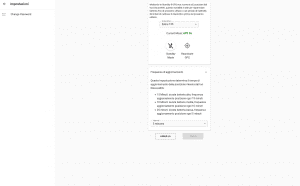
On the Settings - Control and Command page you can set:
- Activation/Deactivation of GPS position tracking
- Set Upload Time (Update Frequency)
- Reboot your DiscoveRig device.
- Turn off your DiscoveRig device
Activation/Deactivation of GPS position tracking
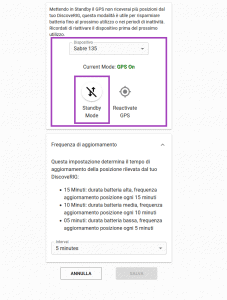
In this section you can pause the device, going to turn off the GPS signal reception. You will find a drop-down menu with the title "Device" here you must select the DiscoveRig to which the settings will apply. It is very important to pay attention in case you own more than one DiscoveRig to select the correct one.
"Current Mode: GPS On"
It means that the current status of the GPS on the device is accessed and therefore you will receive constant location updates.
"Current Mode: GPS Off"
It means that the current status of the GPS on the device is turned off and therefore you will not receive location updates as long as this mode is active.
In the center of the Settings - Control and Command screen are two buttons:
- StandBy Mode button: Pressing this button will turn off the GPS signal reception on your DiscoveRig
- Reactivate GPS button: Pressing this button will turn on GPS signal reception on your DiscoveRig
WARNING!
DiscoveRig has a "warm-up" time of 5 to 15 minutes; no positions will be received during this time. The status of the device will change to GPS ON.
UPDATE FREQUENCY
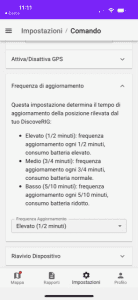
The update rate is the interval of time every time D-Rig or D-Handle sends its position. Three intervals (High - Medium - Low) can be selected.
High (1/2 minutes): update frequency every 1/2 minute, very high battery consumption. (About 1 day of battery life)
Medium (3/4 minutes): update frequency every 3/4 minutes, normal battery consumption. (About 2 days of battery life)
Low (5/10 minutes): update frequency every 5/10 minutes, low battery consumption. (About 3 days of battery life)
Warning. When the update rate is set to "High" you will receive a position every 60 seconds, this mode greatly increases accuracy and consequently drains the battery quickly. We recommend using this setting in conjunction with "StandBy Mode" when you do not need to receive updated position (For example, when moving by car to the DropZone). With continuous movement, in the "Elevated" mode the battery life is 5 hours.
Select from the drop-down menu one of the available intervals, to save the setting press the SAVE button.
DISCOVERIG RESTART
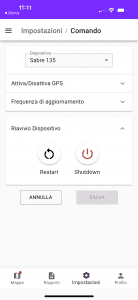
The "Restart" button is for Restarting the device, this function can be useful if you have not been receiving positions for a while, or when you are asked by technical support to perform a reboot.
Restart takes 5 minutes. The first position will be displayed after the "warm-up" time of 15 minutes.
DISCOVERIG SHUTDOWN
"Shutdown" server button to Turn off the device. A "Warning" screen will be displayed where you are asked to confirm your intention to shut down the device.
WARNING! Once the device is turned off, it can only be turned back on via one of two modes:
- Press and hold the "Action" button on the device for 3 seconds. (FOR D-RIG ONLY)
- Connect the device to a power source (5V) with the USB charging cable provided in the package.
AFTER TURNING OFF FROM APP OR PORTAL, IT IS NOT POSSIBLE TO TURN THE DEVICE BACK ON REMOTELY!

 EN
EN  IT
IT