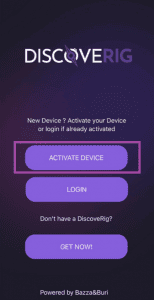
Device activation:
To proceed with the use of the newly purchased device, it is necessary to activate the device.
You can activate the device from the DiscoveRig App, when you first open the App just press the "ACTIVATE DEVICE" button or if you have difficulty viewing the page you can go to the following address discoverig.com/activation
WARNING: Before proceeding with activation connect your device with the included USB cable to a USB outlet, DiscoveRig will automatically turn on you do NOT have to press the "action" button.
After the activation procedure is finished, if you see the words "DISCONNECTED" in the app, it is normal, the device may have been off for quite a long time and therefore needs 30 minutes to recharge and 15 minutes to get the first reliable GPS position (GPS system warm-up time to get the first valid position) we recommend that you take the device outdoors to speed up the initialization procedure.
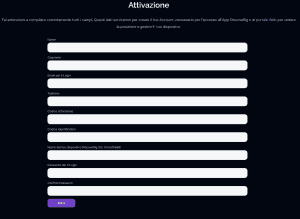
Complete the Activation form:
First and Last Name: Your First Name and Last Name will be associated with your device and used in case you decide to share your real-time location with the DropZone.
Email for Login: Your Email, which will be used to access the App and Web portal, as well as to send you alerts regarding the status of your device and its subscription.
Phone: Your phone number, we will not send you any communication only serves as identity verification in case you lose your login password
Activation Code: Inside the device package you will find the "ACTIVATION" sheet where the secret code to activate the device is listed. You will only be asked for this code in this activation form. Once the device is activated this code will no longer be valid.
ID Code: Inside the package of the device you will find the "ACTIVATION" sheet where the Identification code of the device is listed, this code you will be asked for every time you want to associate a subscription plan or want to receive technical support. The code can also be found on the outside of the package, in the "Card" section of the device on the app or in the Web Portal as well as on the device itself under the cover.
Device Name: The name you want to give your device, for example, "Crossfire 119" is the name of the device that will be displayed in the app and in the Web Portal.
Password for Login: The Password, which you will use to access the App and Web Portal
You will also be prompted to choose a plan to associate with the device (6-month or annual subscription) once you press the "ACTIVATE" button the device will be activated with 6 months of free use and you will be directed to the Check-out page where you can associate a payment method.
(This is not mandatory, but we recommend hooking up a payment method in order to automatically renew the subscription when it expires, Will not be charged any fees before the 6 months of free subscription provided with activation).
Full Activation:
Once you have filled out all the required information, portai return to the DiscoveRig application and LogIn with the email and password you provided during activation.
Are you experiencing problems with activation ?
If you have difficulty with activation or cannot access the App after successful activation, please contact technical support by opening a ticket from your member area discoverig.co.uk/my-account or send us an email to support@discoverig.it indicating your Device ID.

 EN
EN  IT
IT