Automatic subscription renewal:
You will receive an Email alert 5 days before your subscription expires (If you also installed the DiscoveRig app and gave consent for notifications, you will also receive a push notification) to remind you that a payment will be automatically made shortly using the payment method you chose during activation. If the payment is successful, you will receive a confirmation email.
Subscription renewal before expiration:
It is not possible to renew the subscription before it expires; however, it is possible to cancel the current subscription (Section My-Account / My Subscription) and activate a new subscription. Doing so will renew your subscription before it expires.
Subscription renewal after expiration:
From the (Section My-Account / My Subscription) you can always see the status of your subscription and renew the plan manually if automatic renewal attempts have failed.
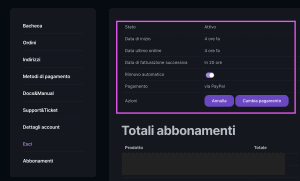
If you cannot renew your subscription manually from this section (it has probably been a long time since it expired) , just purchase a new subscription from the Store DiscoveRig.
WARNING: During the purchase of a new subscription, the IDENTIFIER Of the device. You can find it under the lid of the device itself, on the back of the package, in the activation leaflet inside the package, or in the device card (In the Smartphone App or from the WebPortal). Be careful to enter the ID code correctly, as if incorrect or wrong DiscoveRig will not reverse the transaction and will not issue a refund.
If you are having difficulty finding the COIDCE IDENTIFICATION open a support ticket in your restricted area or send an email to support@discoverig.it giving your details.

 EN
EN  IT
IT