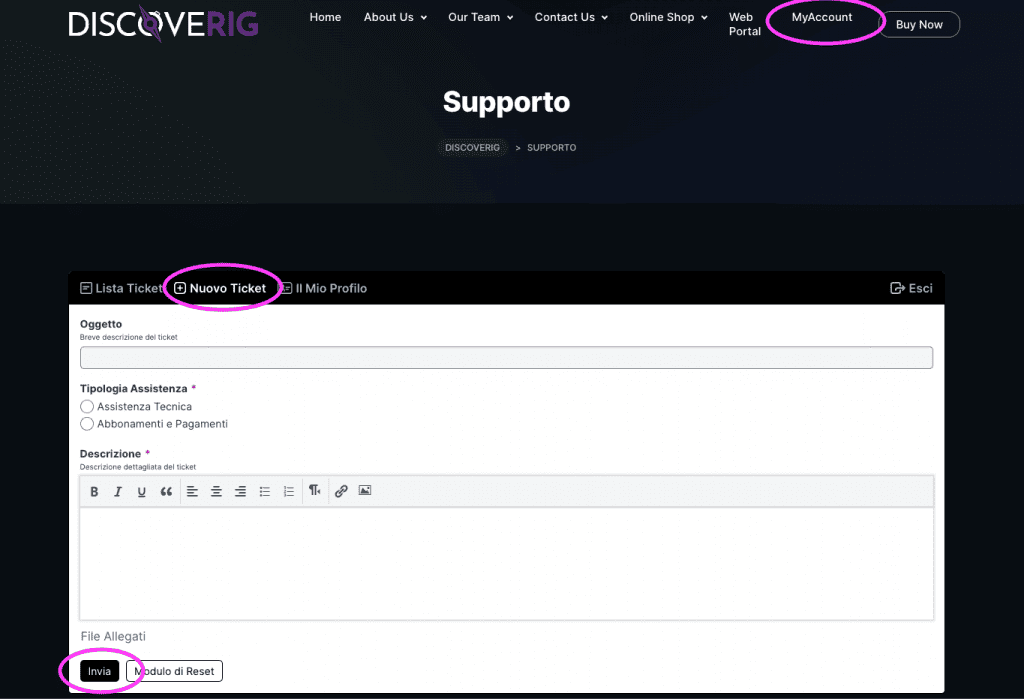
Access the MyAccount area:
- Access the MyAccount section from the discoverig.com website
Select Support-Help:
- Look in the menu in the MyAccount section for Support-Help.
Select New Ticket
- Pressing on the "New Ticket" button will open a window like the one shown in the image above
Fill out the Form:
- Provide the information requested in the ticket opening form. This information may include subject of the request and a detailed description of the problem or question. We ask that you be as specific as possible. If your problem requires documents or screenshots, be sure to attach them to the ticket. This can help the support team better understand the situation.
Sending the Ticket:
- Once you have completed the form, press the "Submit" button to submit the ticket.
Receiving a Confirmation:
- After submission, you should receive a confirmation that the ticket has been received.
Ticket Status Monitoring:
- You can monitor the status of the ticket directly from the MyAccount - Support-Heklp section.

 EN
EN  IT
IT